Page 1 of 1

GTA SA "Directx 9" issue

Posted: June 27th, 2017, 4:29 pm
by Darien
Image

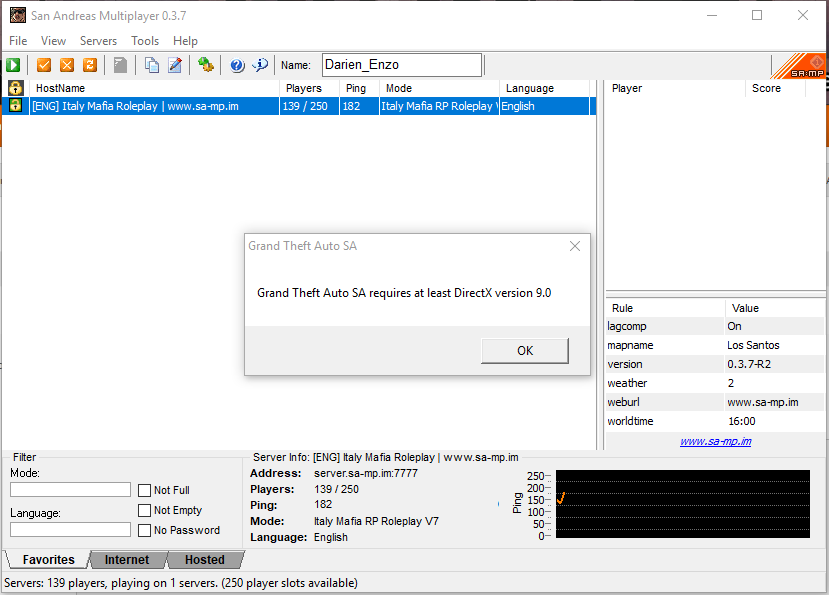
So I upgraded to Windows 10 yesterday and when I try to start GTA SA (Both SA and SAMP) it gives me the error above.

Yes, I have already done a Google search and seen that you can change the dx93.dll (or whatever it's called) to dx93_32.dll. That didn't work, I also tried deleting the gta_sa.set file in the GTA SA User Files.

Both of the things I tried didn't work.


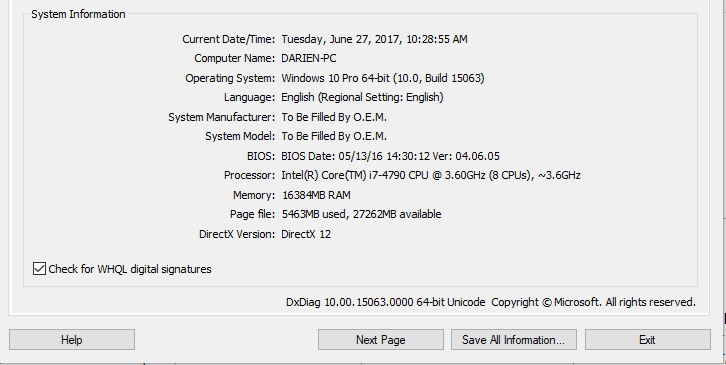
Information that might be needed:

Image

Re: GTA SA "Directx 9" issue

Posted: June 27th, 2017, 4:33 pm
by Benjamino
I had the same issue when I brought my new pc . This video helped me https://youtu.be/gl3mXsxYVIs


Inviato dal mio iPhone utilizzando Tapatalk

Re: GTA SA

Posted: June 27th, 2017, 4:37 pm
by Darien
Rob Banks wrote:I had the same issue when I brought my new pc . This video helped me https://youtu.be/gl3mXsxYVIs


Inviato dal mio iPhone utilizzando Tapatalk
You are a god.

Re: GTA SA "Directx 9" issue

Posted: June 27th, 2017, 4:37 pm
by Italy Mafia RP
The question has been answered!
If you still want to discuss this matter, please contact a moderator and ask for the thread to be re-opened!