Page 1 of 2
PC sounds problem
Posted: October 17th, 2017, 4:28 pm
by Snoozy
I've got my earphones plugged but there's no sound coming out.. I googled and found nothing, help me please..
Re: PC sounds problem
Posted: October 17th, 2017, 5:33 pm
by Resick
have you installed the drivers?
Re: PC sounds problem
Posted: October 17th, 2017, 5:45 pm
by tisler
What kind of earbuds?
3.5mm socket or USB?
Re: PC sounds problem
Posted: October 17th, 2017, 10:34 pm
by PONZI
are you sure you're not deaf?
Re: PC sounds problem
Posted: October 19th, 2017, 1:58 am
by Snoozy
tisler wrote: ↑October 17th, 2017, 5:45 pm
What kind of earbuds?
3.5mm socket or USB?
3.5mm socket..
@Resick: Yes, I did.
Re: PC sounds problem
Posted: October 19th, 2017, 4:19 am
by SuiCxDe
Normqlly when a earphone is plugged in Realtek audi manager pops up letting u select the output device.even in laptops a popup comes letting you select the output device.did u check ur earphones using a phone?
Eventhough all 3.5mm jacks look the same some does not fit in.Ex= original Sony handsfree that comes with the phone doesn't fit to pcs.
Re: PC sounds problem
Posted: October 19th, 2017, 4:25 am
by vans
windows 10 or ?
Re: PC sounds problem
Posted: October 19th, 2017, 2:12 pm
by Snoozy
The earphones worked a while ago, but suddenly stopped working, @SuiCxDe..
@Dietrich Troy: Yes, Windows 10.
Re: PC sounds problem
Posted: October 19th, 2017, 2:18 pm
by vans
Snoozy wrote: ↑October 19th, 2017, 2:12 pm
The earphones worked a while ago, but suddenly stopped working, @SuiCxDe..
@Dietrich Troy: Yes, Windows 10.
Press on the speaker icon and you'll have to options above the volume bar.
Re: PC sounds problem
Posted: October 19th, 2017, 2:33 pm
by Snoozy
Dietrich Troy wrote: ↑October 19th, 2017, 2:18 pm
Snoozy wrote: ↑October 19th, 2017, 2:12 pm
The earphones worked a while ago, but suddenly stopped working, @SuiCxDe..
@Dietrich Troy: Yes, Windows 10.
Press on the speaker icon and you'll have to options above the volume bar.
It has nothing to do with that..
Re: PC sounds problem
Posted: October 20th, 2017, 7:39 pm
by PaC
What were you using before as your default sound output? Your earphones or speakers?
Re: PC sounds problem
Posted: October 21st, 2017, 4:09 pm
by Stonex3
Snoozy wrote: ↑October 19th, 2017, 2:12 pm
The earphones worked a while ago, but suddenly stopped working, @SuiCxDe..
@Dietrich Troy: Yes, Windows 10.
Do you get sound via speakers and are you sure the earphones didnt break8
Re: PC sounds problem
Posted: October 21st, 2017, 7:13 pm
by Snoozy
I don't have any speakers, I got no sound in my PC. And yes, my earphones work on phone.
Re: PC sounds problem
Posted: October 21st, 2017, 7:42 pm
by SuiCxDe
Try plugging in a speaker Or different headset to see whether thejack in pc is working
Re: PC sounds problem
Posted: October 22nd, 2017, 2:58 pm
by Snoozy
There's sound on PC but no getting out from any speaker/headset. I recorded and uploaded a video, checked it from phone and sounds were there.
@tisler help!!
Re: PC sounds problem
Posted: October 22nd, 2017, 3:10 pm
by tisler
Did you try any other headphones/speakers?
Re: PC sounds problem
Posted: October 22nd, 2017, 3:10 pm
by Snoozy
tisler wrote: ↑October 22nd, 2017, 3:10 pm
Did you try any other headphones/speakers?
Nothing works, could it be sound card?
Re: PC sounds problem
Posted: October 22nd, 2017, 3:11 pm
by tisler
Snoozy wrote: ↑October 22nd, 2017, 3:10 pm
tisler wrote: ↑October 22nd, 2017, 3:10 pm
Did you try any other headphones/speakers?
Nothing works, could it be sound card?
Are your speakers set on default device?
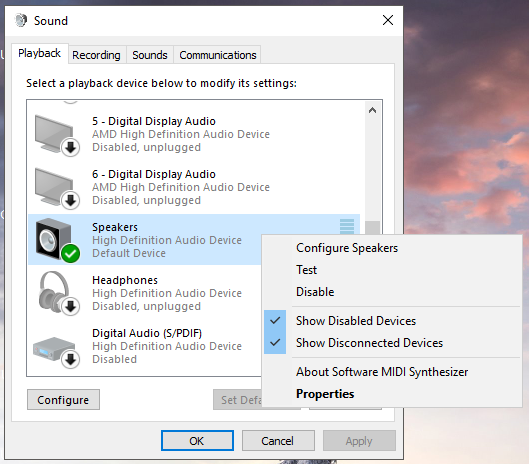
Re: PC sounds problem
Posted: October 22nd, 2017, 3:12 pm
by Snoozy
Re: PC sounds problem
Posted: October 22nd, 2017, 3:19 pm
by leonzio
download realtek hd audio manager -> install it -> try plugging headphones in
i remember having a problem with sound too, don't remember what exactly.. but installing realtek helped me
Re: PC sounds problem
Posted: October 22nd, 2017, 3:20 pm
by tisler
Press on the 'playback' tab above instead and show me that.
Re: PC sounds problem
Posted: October 22nd, 2017, 3:21 pm
by Snoozy
tisler wrote: ↑October 22nd, 2017, 3:20 pm
Press on the 'playback' tab above instead and show me that.
http://prntscr.com/h0i7xd
Re: PC sounds problem
Posted: October 23rd, 2017, 8:45 pm
by tisler
Did you try installing drivers or do you need help to install them?
Re: PC sounds problem
Posted: October 23rd, 2017, 10:05 pm
by Snoozy
I installed them and nothing happened.. Playing without sounds is a pain in the ass, oh gosh, what is this problem?
Re: PC sounds problem
Posted: October 24th, 2017, 10:33 pm
by tisler
Are you sure you installed the proper ones?
> find out the motherboard model name
> google it, you should be redirected to the manufacturer page
> go on support/drivers and try to download the sound drivers from there
If you can't do it yourself, tell me the motherboard model.
Did you play without sound so far or why did it happen?
Re: PC sounds problem
Posted: October 25th, 2017, 12:25 am
by Snoozy
I've been using earphones since months and they always worked, but suddenly stopped..
I've downloaded the drivers already!! like 2-3 times..
Re: PC sounds problem
Posted: October 25th, 2017, 4:05 pm
by ALDOoo
@Snoozy
most of the PC's, have a built-in small speaker. When you unplug your headphones can you hear sounds of your pc, from the speaker?
and try to uninstall your audio drivers, and make sure its gone from the playback devices. Then restart your pc and re-install the downloaded audio drivers.
Re: PC sounds problem
Posted: October 25th, 2017, 4:31 pm
by Snoozy
I'm constantly installing Realteak drivers but they never manage to appear at the Playback devices, what is this?
Re: PC sounds problem
Posted: October 25th, 2017, 5:50 pm
by Donny
are you clicking?
Re: PC sounds problem
Posted: October 25th, 2017, 5:54 pm
by Snoozy
I'm unable to download Realteak drivers, I'm only having this at the Device Manager.
http://prntscr.com/h1wfzf