I currently have a RangeRover mod on my Huntley:
Spoiler

Spoiler

Spoiler

I was told this is the unmoded file:
http://www.mediafire.com/file/4ja3h3c2m ... untley.zip
Thanks!





Can you please send me a link of that.Gabby wrote:Also a better tip for next time,use Modloader the one which Whiskey uses,its really easy and you can even enable/disable mods from ingame
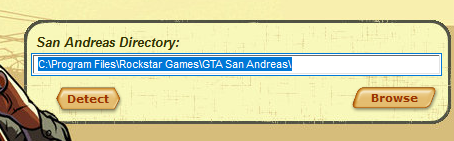
I have a "F Drive" where my GTA San Files are stored however when I go on browse and click the folder it still comes up as "D Drive"tisler wrote:In SAMI the directory must be set correctly. Make sure the path is correct first (do not follow my directory path if you're unsure where your GTA is located at. Find it out first, since it might be different for most of us. ) If it still gives the same error, that's because you have an illegal version of GTA and it doesn't include registry files. What you can do is use GGMM or a simple .img opener (for gta3.img) so you can replace huntley.txd and huntley.dff.
Image
If you think you've done everything correctly and installed the mod and the mod still appears, do this:
Since there's a virtual store folder of the game that windows (8+) uses for backup files, your mods still stay installed and lots of people keep reinstalling their games for this reason.
Hold down the windows key and press R, you'll be at C:\Users\tisler\AppData\Roaming
Go a folder back so you're in C:\Users\tisler\AppData, then navigate to AppData\Local\VirtualStore\Program Files\Rockstar Games and delete the GTA folder



Turns out the "D" is correct, the drive's name is "Files" and it's sign is "D" however as the Screen Shots show when I add the unmod file it says that the modding was successful however it's not; I still see a RangeRover not a Huntley.vin wrote:Can't you manually change the "D" to an "F"?


Or just continue using modloader to install any mods in the future.Thomas wrote:Next time use samp.img just maybe